 潘多拉音乐转换器

 Mac
Mac Windows
第一部分:入门指南 TunesFun 潘多拉音乐转换器
步骤1。 安装 TunesFun 潘多拉音乐转换器
下载并安装最新版本的 TunesFun 在您的电脑上安装 Pandora 音乐转换器。安装完成后,启动程序即可开始使用。
步骤 2. 激活 TunesFun 潘多拉音乐转换器
启动软件后,您可以选择继续免费试用,或者使用许可证密钥激活完整版本。
免费试用用户: 如果您没有许可证密钥,可以直接启动程序并探索其可用功能。免费试用版仅允许您转换 Pandora Music 中的 3 首完整歌曲。要转换更多曲目而不受 Apple 的限制,您需要购买许可证。去 TunesFun 在线商店您可以联系我们的客服团队,了解最新的促销活动和特价优惠。)
付费用户:如果您已购买许可证,请激活软件以解锁完整版。点击左下角的个人资料图标,然后选择“使用许可证登录”。输入您购买时使用的邮箱地址和注册码/许可证密钥。点击“登录”完成激活。激活后,您即可使用许可证包含的所有功能。
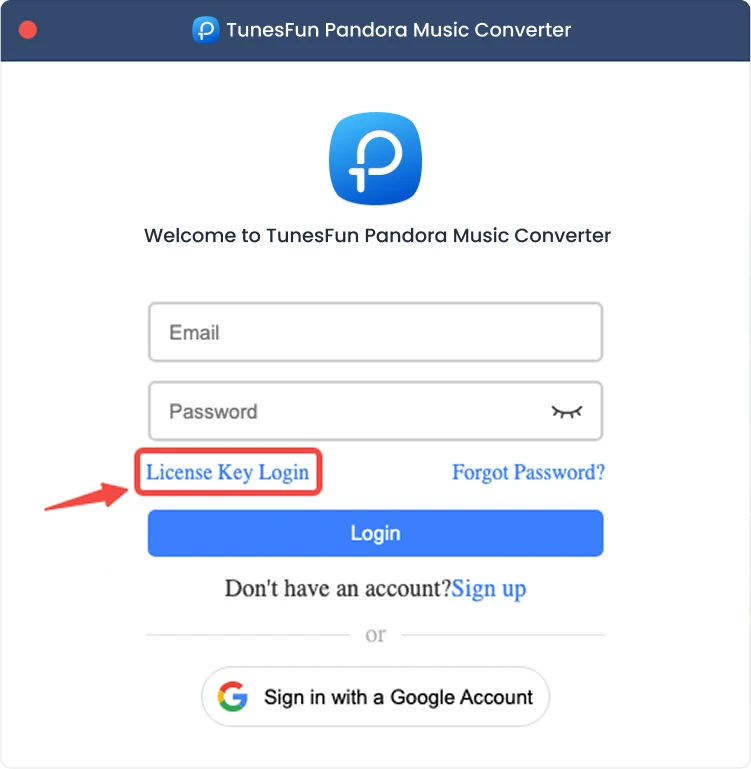
注意:请确保输入与购买时关联的电子邮件地址,并使用正确的注册码。验证过程可能需要连接互联网。
第二部分:如何添加音乐以进行转换
第一步:登录 Pandora Music
TunesFun Pandora音乐转换器集成了官方的Pandora音乐网页播放器。请先登录您的Pandora音乐帐户以浏览您的音乐库。

步骤二:为程序添加音乐
登录您的音乐账号后,您可以浏览音乐库并选择要转换的内容。点击歌曲或播放列表旁边的“添加到转换”按钮,即可将选定的音乐添加到转换列表中。您也可以将歌曲、播放列表或其他支持的内容拖放到界面右侧的浮动“+”图标上。
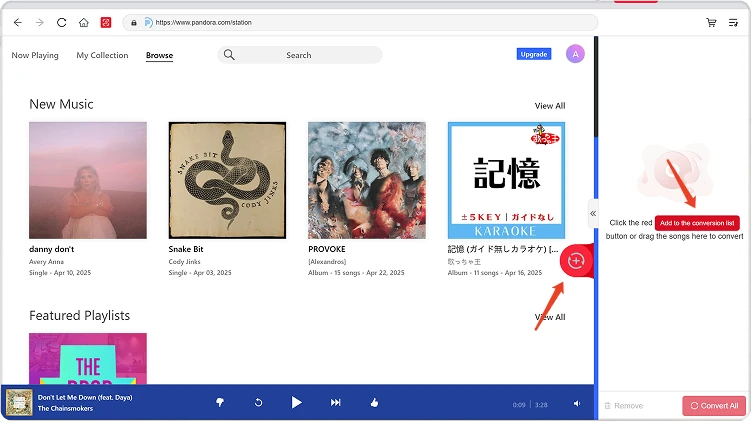
内容可用性:任何歌曲或专辑的可用性完全取决于您使用的帐户的订阅状态和地区权限。
步骤3。 选择输出格式
将音乐添加到转换列表并配置好所需的输出设置后,请从可用选项中选择所需的输出格式。如有需要,您还可以调整输出文件夹和其他音频参数。
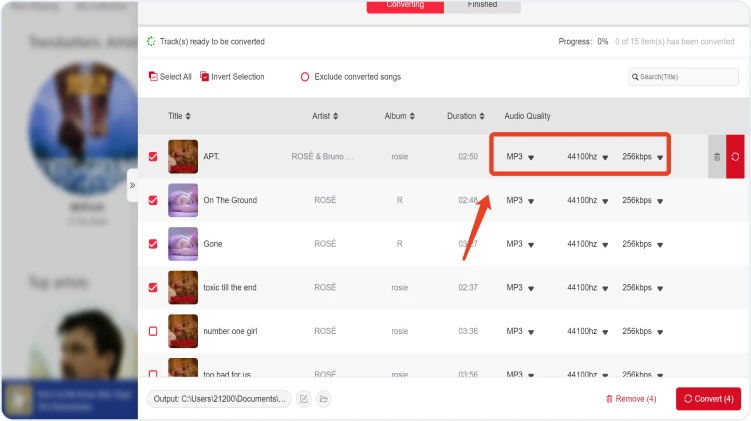
第四步:开始转换音乐
一切准备就绪后,点击单个项目旁边的“立即转换”按钮,或点击“全部转换”一次性处理所有选定的音乐。转换过程中会显示进度。请耐心等待转换完成。
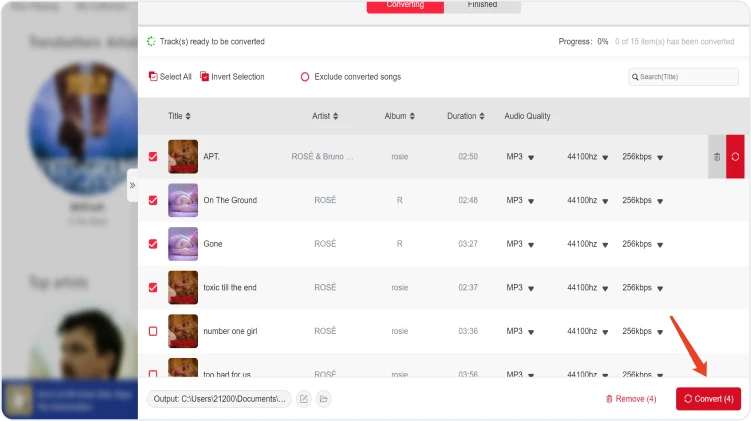
步骤 5. 检查转换后的音乐
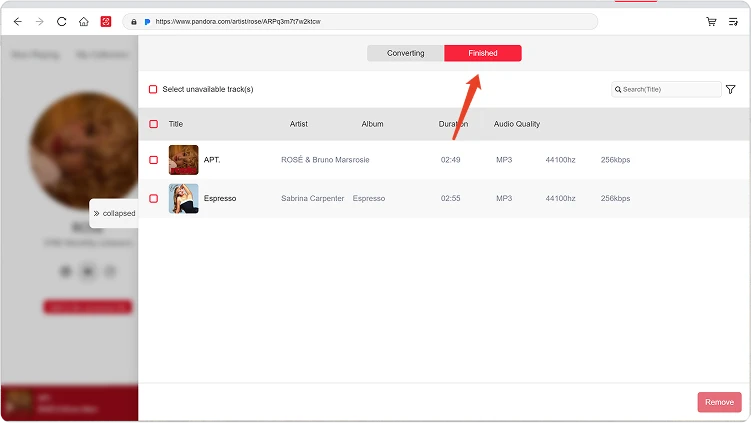
转换完成后,请前往“本地库”部分查看转换后的文件。点击“查看输出文件”打开保存转换后音乐的文件夹。然后,您可以根据需要播放、管理或传输这些文件。
第三部分:如果下载失败该怎么办?
如果在下载或转换音乐时遇到问题,请尝试以下方法:
- 请确保您已登录所选的音乐平台。
- 请检查您的网络连接并重试。
- 重新启动 TunesFun 使用 Any Music Converter 转换音乐格式,然后重试下载。
- 请确保您使用的是最新版本的软件。
如果问题仍然存在,请提交软件日志文件:
- 点击程序右上角的菜单,然后选择“发送反馈”。
- 请在文本框中简要描述您遇到的问题。
- 最后,请在提交前勾选“附加日志文件”复选框。
第三部分:如何预设输出设置和音频参数
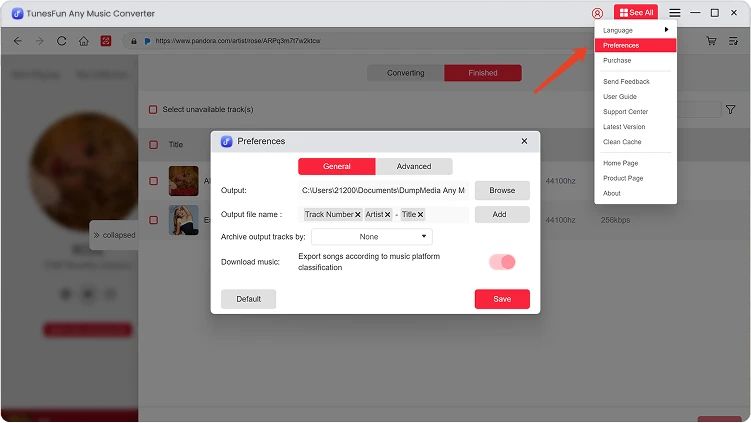
TunesFun Any Music Converter 允许您自定义下载设置和音频参数,从而控制转换过程和输出质量。您可以在开始转换前直接从转换列表中调整这些设置,也可以前往“菜单”>“首选项”预先预设您偏好的设置。
语言
请选择您偏好的软件界面语言。
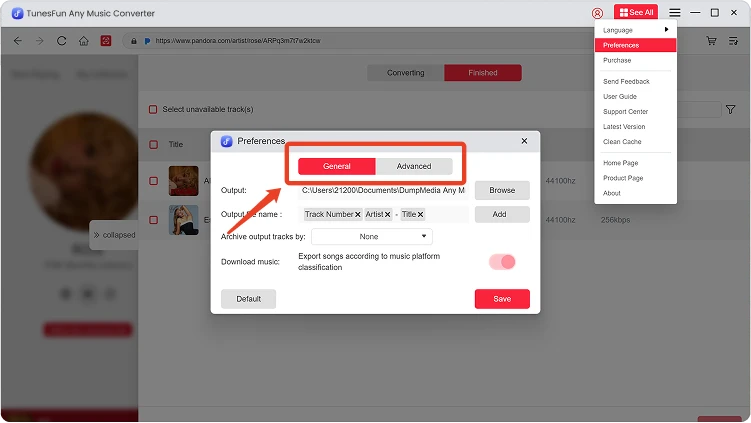
常规设置
- 外观 — 自定义软件界面外观。
- 输出文件夹 — 选择转换后的文件将保存到的位置。
- 自动命名模式 — 自定义转换后文件的命名格式。
- 归档方式 — 选择转换后的音乐文件的组织方式。
- 转化后操作 — 选择转化完成后要执行的操作。
- 保存音乐 — 启用或禁用保存已转换的音乐文件。
- 歌词 — 启用或禁用将歌词与转换后的音乐一起保存。
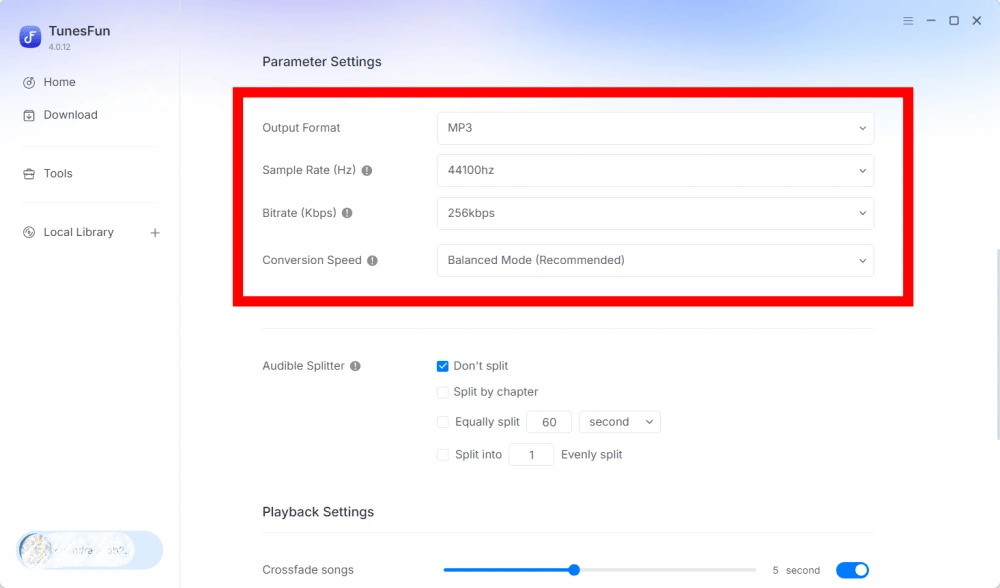
参数设定
- 输出格式 — 选择所需的音频输出格式。
- 采样率(Hz)— 设置音频采样率。
- 比特率(Kbps)——调整音频比特率以控制输出质量。
- 转换速度——根据您的需要调整转换速度。
- Audible Splitter — 将 Audible 有声读物分割成更小的部分。
播放设置
歌曲淡入淡出 — 在播放过程中实现歌曲之间的平滑过渡。
网络设置
- 同时下载 — 设置要同时下载的音乐文件数量。
- 代理 — 配置网络连接的代理设置。
其他设置
弹出窗口 — 启用或禁用弹出式通知。
第四部分:如何管理你的 TunesFun 账户
TunesFun Any Music Converter 允许您直接在软件内管理您的帐户。
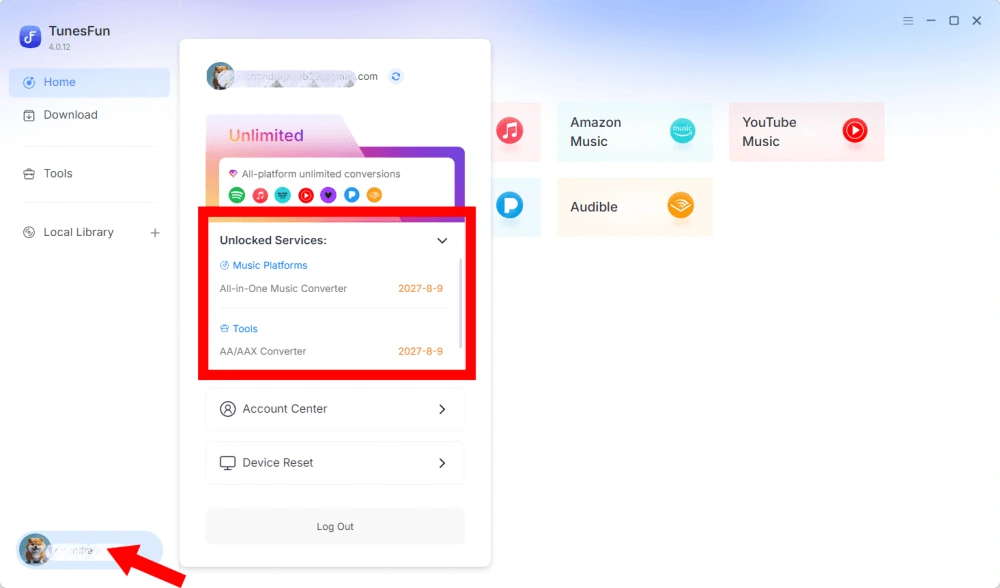
查看已解锁服务
前往“帐户”部分,查看您当前已解锁的服务和功能。 TunesFun 账户。您可以通过此功能查看您的账户状态以及您的许可证下可用的产品或服务。
访问帐户中心
点击个人资料图标 > “账户中心”进入 TunesFun 中心,您可以在这里管理您的帐户及相关信息。
- 个人信息 — 更新您的用户名,然后点击“编辑”更改您的头像照片。
- 删除账户 — 账户删除后,您的账户及其关联的许可证密钥将立即停用,无法再使用。删除账户前,请确保您没有任何有效的订阅。
- 订阅 — 查看和管理您当前的订阅。如果您想取消订阅,只需点击“管理订阅”暂停即可。如果您无法取消,请联系客服([email protected]).
- 管理设备 — 如果您要切换到另一台设备并想要使用 TunesFun 在新设备上,您可以轻松完成此任务。如果无法重置,请联系客服。
- 账单——您可以在这里查看所有订单详情。如果您无法查看账单,请联系客服。
- 更改密码 — 设置您喜欢的新密码。如果您忘记了当前密码,请点击“忘记密码”。按照屏幕上的说明重置密码。