 محول الموسيقى Deezer

 ماك
ماك ويندوز
الجزء الأول: ابدأ بـ TunesFun محول الموسيقى Deezer
الخطوة 1. التثبت TunesFun محول الموسيقى Deezer
قم بتحميل وتثبيت أحدث إصدار من TunesFun قم بتثبيت برنامج Deezer Music Converter على جهاز الكمبيوتر الخاص بك. بمجرد اكتمال التثبيت، قم بتشغيل البرنامج للبدء.
الخطوة 2. التفعيل TunesFun محول الموسيقى Deezer
بعد تشغيل البرنامج، يمكنك اختيار الاستمرار في الفترة التجريبية المجانية أو تفعيل النسخة الكاملة باستخدام مفتاح الترخيص.
لمستخدمي النسخة التجريبية المجانية: إذا لم يكن لديك مفتاح ترخيص، يمكنك تشغيل البرنامج مباشرةً واستكشاف ميزاته المتاحة. مع النسخة التجريبية المجانية، يمكنك تحويل 3 أغاني كاملة فقط من Deezer. لتحويل المزيد من الأغاني دون قيود Apple، ستحتاج إلى شراء الترخيص.انتقل إلى TunesFun متجر الكترونييمكنك الاتصال بفريق دعم العملاء لدينا للاطلاع على أحدث العروض الترويجية والعروض الخاصة.
للمستخدمين المشتركين: إذا كنت قد اشتريت ترخيصًا مسبقًا، فعّل البرنامج لفتح النسخة الكاملة. انقر على أيقونة الملف الشخصي في الزاوية السفلية اليسرى، ثم اختر "تسجيل الدخول باستخدام الترخيص". أدخل عنوان البريد الإلكتروني المرتبط بعملية الشراء ورمز التسجيل/مفتاح الترخيص. انقر على "تسجيل الدخول" لإتمام التفعيل. بمجرد التفعيل، يمكنك الوصول إلى الميزات المشمولة بترخيصك.
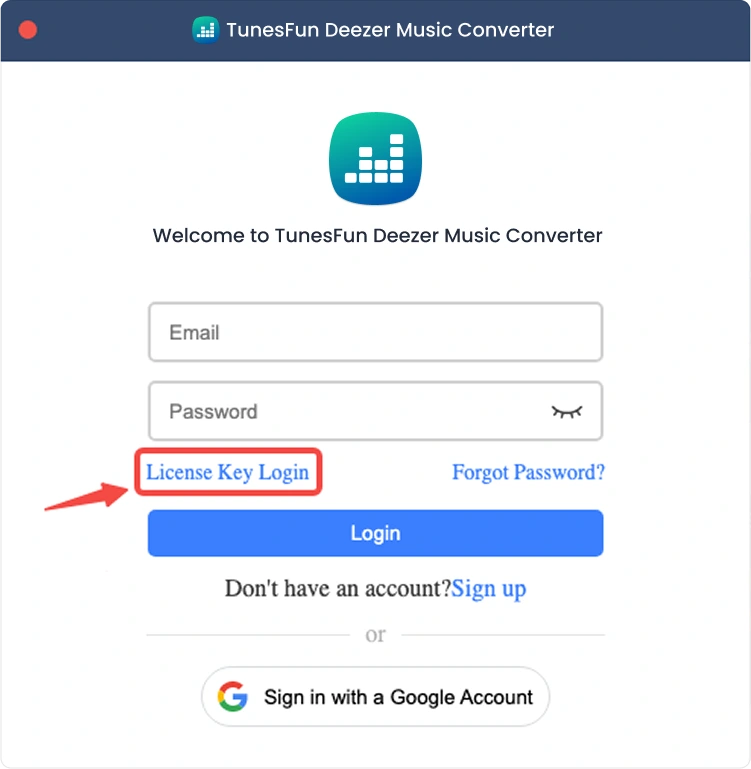
ملاحظة: تأكد من إدخال نفس عنوان البريد الإلكتروني المرتبط بعملية الشراء واستخدام رمز التسجيل الصحيح. قد يلزم وجود اتصال إنترنت نشط للتحقق.
الجزء الثاني: كيفية إضافة الموسيقى للتحويل
الخطوة 1: تسجيل الدخول إلى ديزر ميوزك
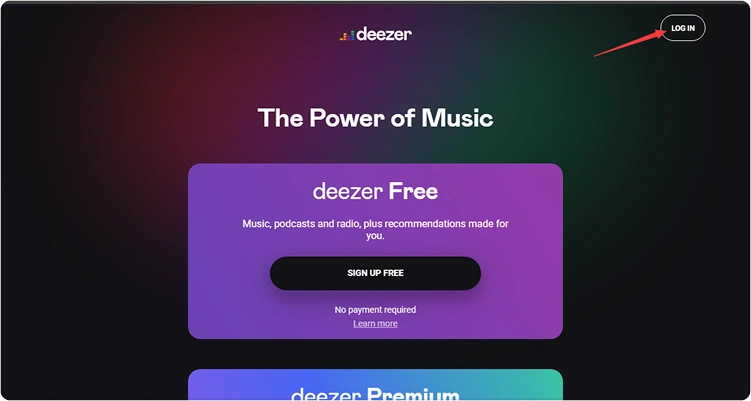
TunesFun يُدمج برنامج Deezer Music Converter مشغل Deezer الرسمي على الويب. يُرجى تسجيل الدخول إلى حسابك على Deezer أولاً لتصفح مكتبة الموسيقى الخاصة بك.
الخطوة الثانية: إضافة الموسيقى إلى البرنامج
بعد تسجيل الدخول إلى حسابك الموسيقي، يمكنك تصفح مكتبة الموسيقى واختيار المحتوى الذي ترغب بتحويله. انقر على "إضافة إلى قائمة التحويل" بجوار المقطع الصوتي أو قائمة التشغيل لإضافة الموسيقى المختارة إلى قائمة التحويل. كما يمكنك سحب وإفلات الأغاني أو قوائم التشغيل أو أي محتوى آخر مدعوم على أيقونة "+" العائمة على الجانب الأيمن من واجهة المستخدم.
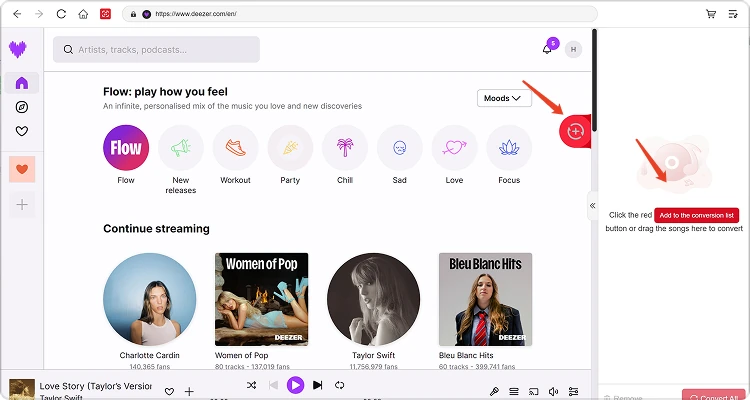
توافر المحتوى: يعتمد توافر أي أغنية أو ألبوم بشكل كامل على حالة الاشتراك والأذونات الإقليمية للحساب الذي تستخدمه.
الخطوة 3. حدد تنسيق الإخراج
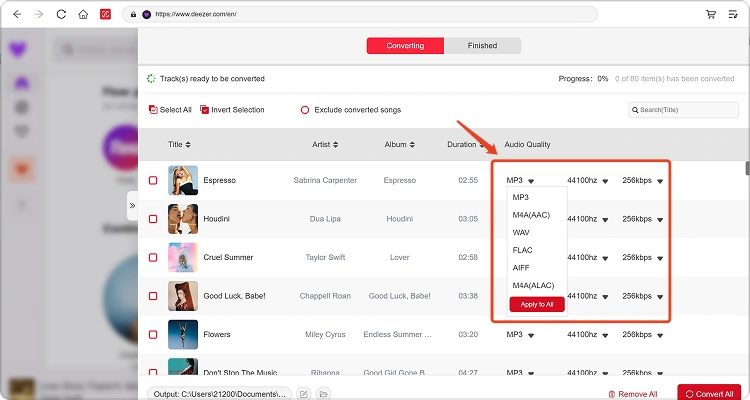
بعد إضافة الموسيقى إلى قائمة التحويل وضبط إعدادات الإخراج المفضلة لديك، اختر تنسيق الإخراج الذي تفضله من الخيارات المتاحة. يمكنك أيضًا تعديل مجلد الإخراج ومعايير الصوت الأخرى إذا لزم الأمر.
الخطوة الرابعة: ابدأ بتحويل الموسيقى
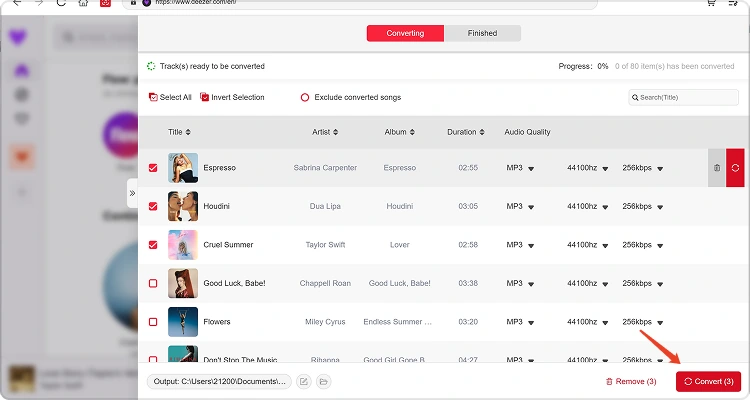
بمجرد تجهيز كل شيء، انقر على زر "تحويل الآن" بجوار العنصر المطلوب، أو انقر على "تحويل الكل" لمعالجة جميع الملفات الموسيقية المحددة دفعة واحدة. سيتم عرض تقدم عملية التحويل أثناء التنفيذ. يُرجى الانتظار حتى اكتمال المهام المحددة.
الخطوة 5. التحقق من الموسيقى المحولة
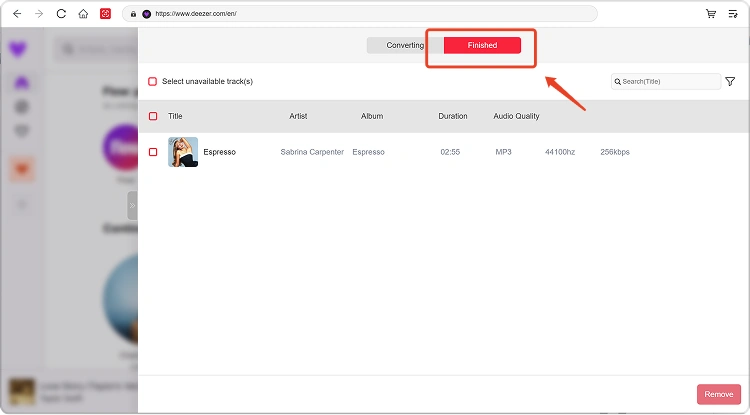
بعد اكتمال التحويل، انتقل إلى قسم المكتبة المحلية لعرض ملفاتك المحولة. انقر على "عرض ملف الإخراج" لفتح المجلد الذي تم حفظ الموسيقى المحولة فيه. يمكنك بعد ذلك تشغيل الملفات أو إدارتها أو نقلها حسب الحاجة.
الجزء الرابع: ماذا أفعل إذا فشل التنزيل؟
إذا واجهت مشكلة أثناء تنزيل الموسيقى أو تحويلها، فجرب ما يلي:
- تأكد من تسجيل دخولك إلى منصة الموسيقى المختارة.
- تحقق من اتصالك بالإنترنت وحاول مرة أخرى.
- إعادة تشغيل TunesFun قم بتشغيل أي برنامج لتحويل الموسيقى وحاول التنزيل مرة أخرى.
- تأكد من استخدامك لأحدث إصدار من البرنامج.
إذا استمرت المشكلة، يرجى إرسال ملف سجل البرنامج:
- انقر على القائمة الموجودة في أعلى يمين البرنامج واختر "إرسال ملاحظات".
- صف بإيجاز المشكلة التي واجهتك في مربع النص.
- وأخيرًا، يرجى تحديد خانة "إرفاق ملف السجل" قبل الإرسال.
الجزء الثالث: كيفية ضبط إعدادات الإخراج ومعلمات الصوت مسبقًا
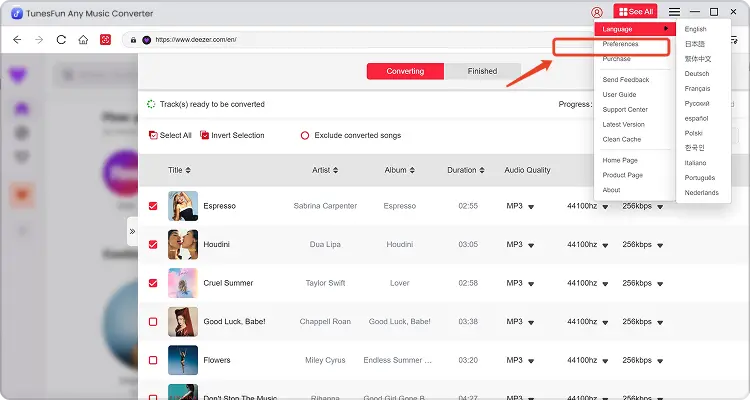
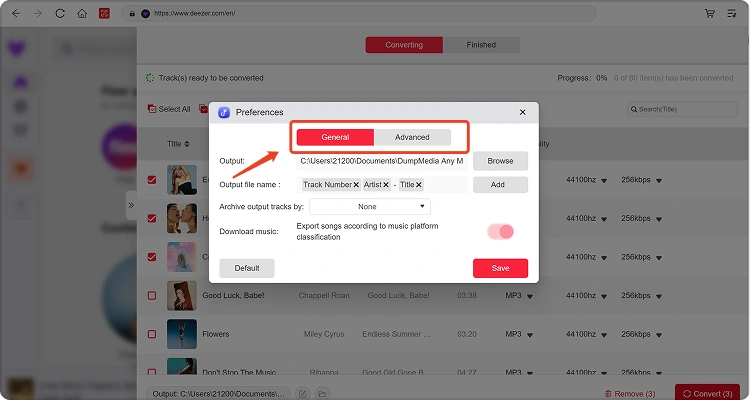
TunesFun يتيح لك برنامج Any Music Converter تخصيص إعدادات التنزيل ومعايير الصوت للتحكم في عملية التحويل وجودة الإخراج. يمكنك ضبط هذه الإعدادات مباشرةً من قائمة التحويل قبل بدء التحويل، أو الانتقال إلى القائمة > التفضيلات لضبط إعداداتك المفضلة مسبقًا.
اللغة
اختر لغتك المفضلة لواجهة البرنامج.
إعدادات عامة
- المظهر — قم بتخصيص مظهر واجهة البرنامج.
- مجلد الإخراج — حدد المكان الذي سيتم فيه حفظ ملفاتك المحولة.
- نمط التسمية التلقائية — تخصيص تنسيق التسمية للملفات المحولة.
- أرشفة حسب — اختر كيفية تنظيم ملفات الموسيقى المحولة.
- بعد التحويل — اختر ما يحدث بعد اكتمال عملية التحويل.
- حفظ الموسيقى — تفعيل أو تعطيل حفظ ملفات الموسيقى المحولة.
- كلمات الأغاني — تفعيل أو تعطيل حفظ كلمات الأغاني مع الموسيقى المحولة.
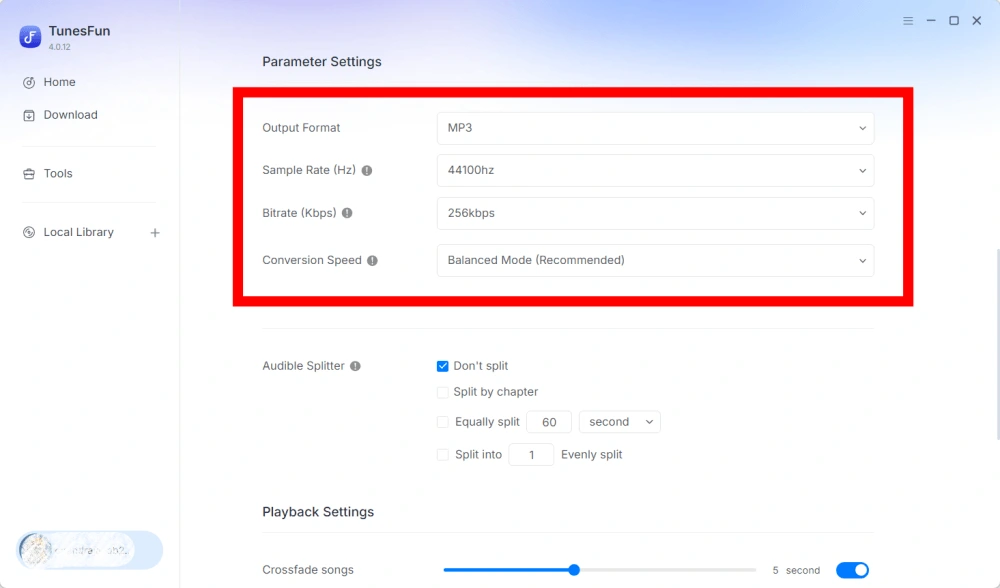
إعدادات المعلمات
- تنسيق الإخراج — حدد تنسيق إخراج الصوت المطلوب.
- معدل أخذ العينات (هرتز) — اضبط معدل أخذ عينات الصوت.
- معدل البت (كيلوبت في الثانية) — اضبط معدل بت الصوت للتحكم في جودة الإخراج.
- سرعة التحويل — اضبط سرعة التحويل وفقًا لاحتياجاتك.
- برنامج Audible Splitter — قم بتقسيم الكتب الصوتية من Audible إلى أجزاء أصغر.
إعدادات التشغيل
خاصية الانتقال السلس بين الأغاني — تتيح هذه الخاصية الانتقال السلس بين الأغاني أثناء التشغيل.
اعدادات الشبكة
- التنزيلات المتزامنة — حدد عدد ملفات الموسيقى المراد تنزيلها في وقت واحد.
- الوكيل — قم بتكوين إعدادات الوكيل لاتصالات الشبكة.
إعدادات أخرى
النوافذ المنبثقة — تفعيل أو تعطيل الإشعارات المنبثقة.
الجزء الرابع: كيفية إدارة TunesFun الحساب
TunesFun يتيح لك برنامج Any Music Converter إدارة حسابك مباشرةً داخل البرنامج.
عرض الخدمات المتاحة
انتقل إلى قسم الحساب لعرض الخدمات والميزات المتاحة حاليًا مع حسابك TunesFun الحساب. يتيح لك هذا التحقق من حالة حسابك والمنتجات أو الخدمات المتاحة بموجب ترخيصك.
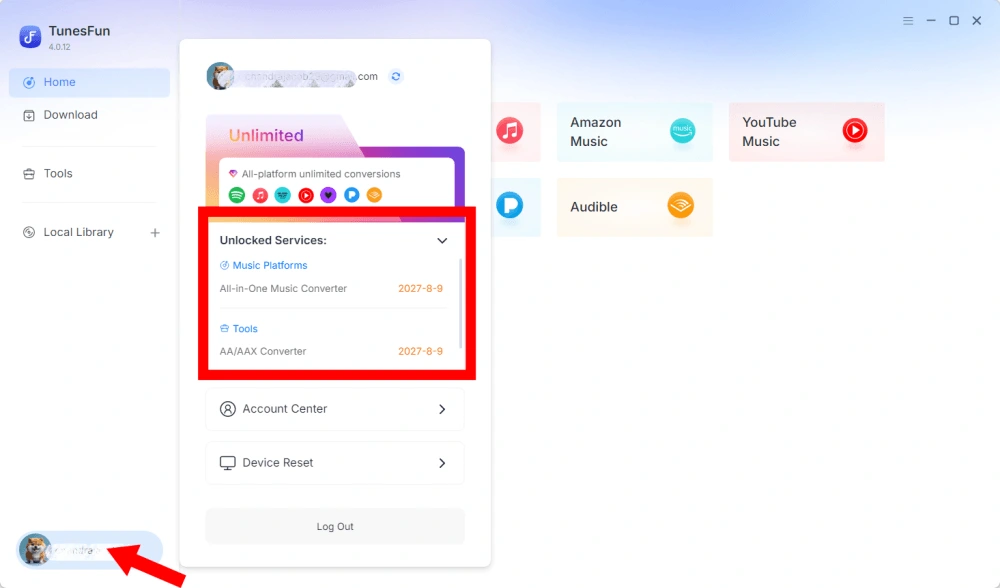
مركز الوصول إلى الحساب
انقر على أيقونة الملف الشخصي > "مركز الحساب" للدخول إلى TunesFun المركز، حيث يمكنك إدارة حسابك والمعلومات ذات الصلة.
- المعلومات الشخصية — قم بتحديث اسم المستخدم الخاص بك وانقر على "تعديل" لتغيير صورة ملفك الشخصي.
- حذف الحساب — بمجرد حذف حسابك، سيتم تعطيل حسابك ومفتاح الترخيص المرتبط به فورًا ولن يكون بالإمكان استخدامه بعد ذلك. قبل حذف حسابك، يُرجى التأكد من عدم وجود أي اشتراكات فعّالة لديك.
- الاشتراكات — يمكنك عرض وإدارة اشتراكاتك الحالية. إذا كنت ترغب في إلغاء اشتراك، فما عليك سوى النقر على "إدارة الاشتراك" لإيقافه مؤقتًا. إذا لم تتمكن من الإلغاء، فيُرجى الاتصال بخدمة العملاء.[البريد الإلكتروني محمي]).
- إدارة الأجهزة — إذا كنت تنتقل إلى جهاز آخر وترغب في استخدامه TunesFun يمكنك إتمام المهمة بسهولة على الجهاز الجديد. إذا لم تتمكن من إعادة الضبط، يُرجى الاتصال بخدمة العملاء.
- الفواتير — يمكنك الاطلاع على جميع تفاصيل الطلب. إذا لم تتمكن من مراجعة الفاتورة، يُرجى التواصل مع خدمة العملاء.
- تغيير كلمة المرور — عيّن كلمة المرور الجديدة التي تريدها. إذا نسيت كلمة مرورك الحالية، فانقر على "نسيت". اتبع التعليمات التي تظهر على الشاشة لإعادة تعيين كلمة مرورك.